Guide, written by the ReachClaw team · Updated
Automated lead generation: how it works, and software that does it
Automated lead generation means software finds businesses that match your ideal customer, writes a first email to each one from what it knows about your product, sends it from your own inbox, and keeps searching on a schedule. This guide explains the five parts of such a system, how to set one up step by step, which kind of software does which job, and exactly what ReachClaw automates and what still needs you.
No invented numbers: every ReachClaw detail below is how the product works today.
What is automated lead generation?
Automated lead generation is software doing the repetitive parts of finding people who might buy from you and getting a first conversation started: searching for matching companies and people, saving their details, writing and sending the first email, and repeating all of that on a schedule. The work is the same as lead generation by hand; what changes is who does each step. You define who to target and what to say. The software runs the process.
There are two kinds, and most guides only cover one. Inbound automation handles people who come to you: a form, a chat or a sign-up collects their details, and software answers them or passes them on. Outbound automation goes and finds people who have never heard of you: it searches for matching businesses, saves contacts and sends a first email. A small business usually needs a little of both, which is why ReachClaw does the outbound search and sending and also puts a chat on your website that collects the email of any visitor who asks for a person.
What automation does not do is judgment. It will not decide that your target market is wrong, and it will not have the conversation once someone replies. Keep that in mind when a tool promises to run your sales for you.
Why doing it by hand stops working
Finding one good lead by hand takes a search, a visit to the company site, a look for the right person, a hunt for an email address, and a note somewhere. Writing the email takes another ten minutes if you want it to read like you meant it. Twenty leads is a morning. That is fine for a week and impossible for a quarter, so the work gets done in bursts and then stops, and the pipeline goes quiet exactly when you are busy with the customers the last burst brought in.
Automation fixes the stopping. The search runs whether or not you have a free morning, every lead gets an email, and every reply reaches you. The quality of the leads and the message is still up to you, which is why the next section starts with targeting and not with sending. If you are still weighing a bought list, a hire or doing it yourself, start with our guide to outbound sales without an SDR.
The five parts of an automated lead generation system
Whatever tools you use, the system has the same five parts. For each one, here is what it means in general and what ReachClaw does.
1. Finding or capturing leads
Where the names come from. Outbound systems search for people who match a profile. Inbound systems collect details from people who arrive on their own, through a form, a chat or a sign-up.
In ReachClaw: ReachClaw searches the public web with the ideal customer profile it built from your website, and saves each person's name, company, role, email and source page. You can also import your own CSV. On the inbound side, its website chat collects the email of any visitor who asks for a person, and you reply from Live chat.
2. Qualifying them
Deciding who is worth contacting. Usually a score built from how well the company and role fit, plus any signals you have.
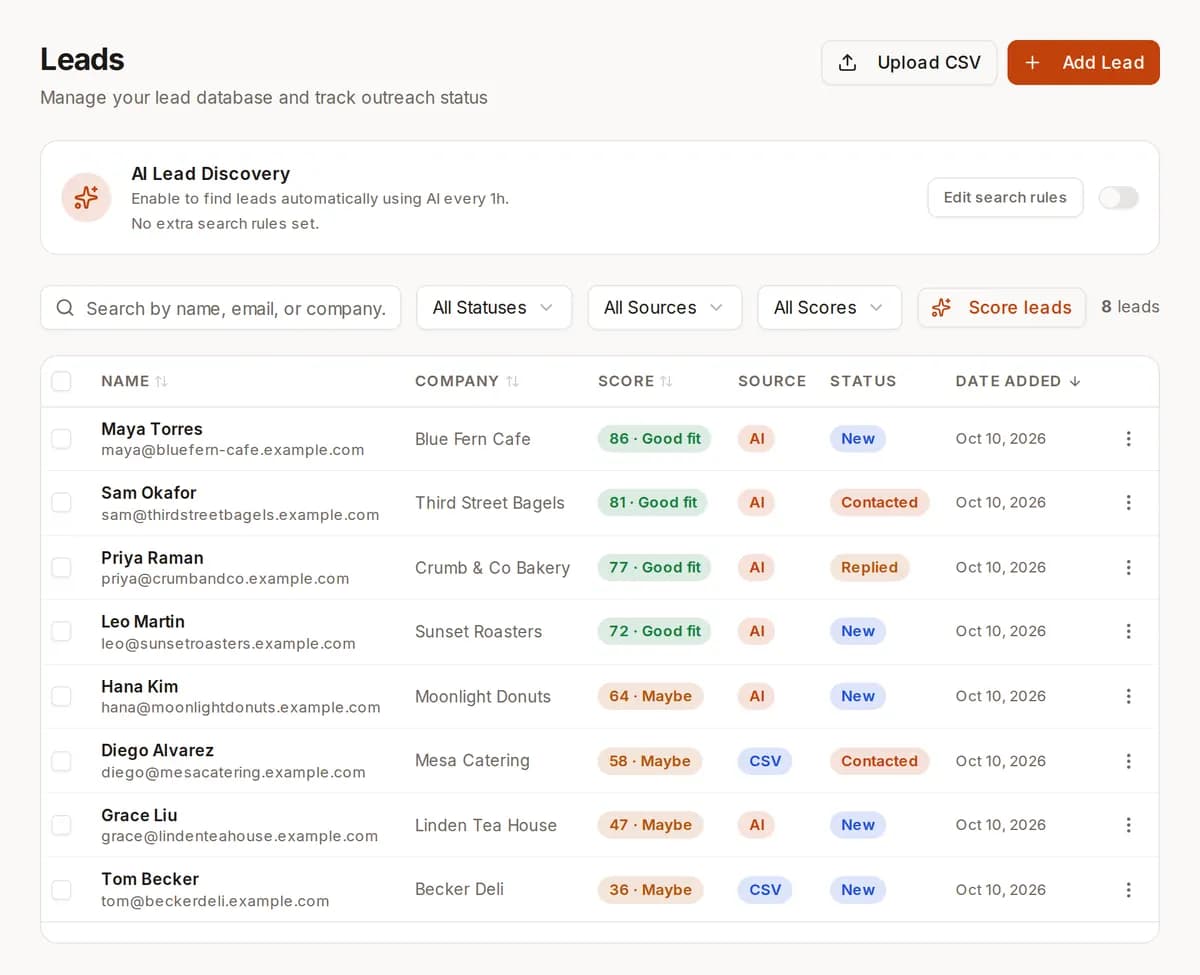
In ReachClaw: From the Leads page you give any lead, or all of them at once, a fit score from 0 to 100 against your profile. 70 and above is marked qualified, 30 to 69 needs review, and under 30 is disqualified. You see the score and the reason next to each lead.
3. Making first contact
The first email or message. Automation writes it from a template and the details it has on the lead, then sends it.
In ReachClaw: Pick a template and ReachClaw writes a version for each lead from your website, documents and notes, then sends it from your Gmail. In Co-pilot mode you approve each one; in Autopilot it sends on its own. Replies to inbound emails are drafted the same way, sorted into support and sales.
4. Keeping it running
The part that makes it automated rather than a one-off task: searches and sends that repeat without you starting them.
In ReachClaw: Automatic search looks for new leads every 3 hours by default, and you can set anything from 5 minutes to once a day. A campaign can run once, at a scheduled time, or repeat on an interval and email only the leads found since the last run.
5. Measuring what happened
Opens, clicks and replies per campaign, so you know which message and which audience worked.
In ReachClaw: The Engagement view shows opens, clicks and replies for each campaign and each lead, with automated scanner hits filtered out so a security tool opening your email does not count as a person.
How to automate lead generation, step by step
The order matters. Steps one to four are thinking and writing; only the last two are automation. Teams that start at step six end up emailing the wrong people with a message nobody checked.
- 1
Write down who you sell to
Industries, company sizes, roles, and the problem you solve. If you skip this, the software will find plenty of people, and most of them will be the wrong ones. In ReachClaw this profile is built from your own website, so keep the site clear about who you sell to and what problem you solve.
- 2
Decide where leads will come from
Outbound search, your own lists, a form on your site, a website chat, or a mix. Each source needs a place to land. ReachClaw puts searched and imported leads in one Leads page.
- 3
Set the rules for who gets contacted
A minimum score, a status, a filter on role or company. In ReachClaw you filter the Leads page and the automatic search keeps that filter.
- 4
Write the first email once, as a template
The template is the message; the software fills in the details for each lead. Say who you are, why you are writing to this person in particular, and what you want them to do. Keep it short.
- 5
Run it in review mode first
Read the first batch of leads and the first batch of emails before anything is sent. Fix the profile or the template if the output is off. ReachClaw's Co-pilot mode holds every email for your approval.
- 6
Turn on the schedule and watch the replies
Once the output is right, let the search and the campaign repeat. Check the Engagement view, answer replies in your inbox, and adjust the template when a line stops working.
Automated lead generation software, by job
No single tool does all of this. Here is what each kind of software does, with well-known examples, and where ReachClaw does and does not fit. Prices change often, so we leave them out; check each vendor's pricing page.
| Job | What it does | Examples |
|---|---|---|
| Forms and landing pages | Collect details from visitors who are already interested. | Typeform, Tally, your website builder's forms |
| Website chat | Answer visitors' questions and collect an email when a person is needed. | ReachClaw live chat, Intercom, Tidio |
| Finding contacts | Search for people who match a profile and save their details. | ReachClaw lead search, Apollo, Clay |
| Cold email sending | Write and send first emails, track opens and replies. | ReachClaw campaigns, Lemlist, Smartlead |
| Follow-up sequences | Send a second and third email to people who did not reply. | Lemlist, Smartlead (ReachClaw does not do this) |
| CRM | Keep the history of every contact and deal. | HubSpot, Pipedrive (ReachClaw does not sync to these) |
| Glue between tools | Move data from one tool to the next when something happens. | Zapier, Make, n8n |
Some teams wire this up themselves with a workflow tool like n8n: a search step, an AI step to write the email, a Gmail node to send it. That works if you have the time and the skill to keep it running. ReachClaw covers finding, scoring, the first email, the repeat schedule and the tracking in one place, with a website chat for the inbound side. It does not do follow-up sequences, email verification, data enrichment or CRM sync; if you need those, pair it with a tool from the table above.
How ReachClaw does it
Connect your Gmail, enter your website, and this is what runs.
Builds the customer profile from your website
ReachClaw reads your website and builds an ideal customer profile from it: the industries, roles and problems you solve. The search starts from what you actually sell, not from a list you typed in.
Searches the web for leads
It searches public pages for people at matching businesses and saves their name, company, role, email and the page it found them on. Only people with a visible email are saved.
Keeps searching on a schedule
Turn on automatic search and it looks again every 3 hours by default, or on any interval from 5 minutes to a day, using the filter you set on the Leads page.
Scores any lead from 0 to 100 on request
Press Score leads on the Leads page: 70 and above is qualified, 30 to 69 needs review, under 30 is disqualified. Found and imported leads alike.
Try the rubric in the free lead scoring calculatorWrites an email for each lead
Pick a template and it writes a version for each lead from your website, documents and notes, then sends from your Gmail. Co-pilot mode holds each email for your approval; Autopilot sends.
Runs the campaign again on its own
Send now, schedule it, or repeat it every few hours or days. Each repeat emails only the leads found since the last run, and the Engagement view shows who opened, clicked and replied.
The inbound side: website chat and your inbox
The same account answers visitors on your website from your own pages, and when a visitor asks for a person it collects their email and message for you to reply to from Live chat. Inbound emails to your Gmail are sorted into support and sales and a reply is drafted from the same knowledge. Those chat contacts stay in Live chat; they are not added to the Leads list on their own. How the website chat works.
Mistakes that waste the automation
Automating before the targeting is right
A vague customer profile produces a long list of poor fits, and the automation then emails all of them. Fix the profile first; the score bands only help if the profile behind them is honest.
Sending volume your account cannot carry
Hundreds of cold emails a day from a normal Gmail account will land in spam and can get the account flagged. Keep the numbers modest, write to people with a reason to hear from you, and stop when asked.
Treating every open as interest
Security scanners open and click links in email before a person ever sees it. If your tool does not filter them, your open rate is partly fiction. Look at replies, not opens, when judging a campaign.
Letting the first batch go out unread
The first emails show you whether the template and the profile work. Read them. Review mode exists for exactly this.
Expecting the software to close
Automation gets the first email out and brings the reply to you. The conversation after that is yours. If nobody answers replies within a day, the automation has done its job and the business has not.
What stays manual
Automation handles volume, not judgment. You still decide who to target, you still write or approve the message, and you still have the conversation when someone replies. ReachClaw also leaves some things out on purpose: it does not verify email addresses, enrich contacts with data from elsewhere, send multi-step follow-up sequences, warm up your account or sync to a CRM. The software's job is to make sure the search keeps running, every lead gets an email, and every reply reaches you.
What it costs
One flat price per plan. The AI runs on your own Anthropic API key, so that usage is billed by Anthropic at their published prices, on top of the plan.
| Plan | Price | Outbound emails | Lead search |
|---|---|---|---|
| Free | $0 | None | Not included |
| Solo | $6.99/mo | 100 a month | Included |
| Growth | $29.99/mo | 500 a month | Included |
| Scale | $69.99/mo | No limit | Included |
You can sign up and look around for free; lead search and sending need a paid plan. Compare all plans.
Keep reading
AI lead generation
The longer guide: what AI can and can't do when finding and contacting leads.
Best AI lead generation tools
Finders, writers and all-in-one tools compared, with where ReachClaw fits.
Lead generation software
How ReachClaw finds businesses that match your ideal customer and emails them.
Sales automation software
How a campaign can run again on a schedule, so outreach keeps going without you.
Questions people ask
What is automated lead generation?
Automated lead generation means software does the repetitive parts of finding and contacting potential customers for you: it looks for businesses that match your ideal customer, saves their contact details, writes a first email to each one and sends it from your email account, then keeps going on a schedule. You still check what it found, choose what to send and handle the replies.
What is the difference between inbound and outbound lead generation automation?
Inbound automation handles people who come to you: a form or a website chat collects their details, and software answers or passes them on. Outbound automation goes and finds people who have not heard of you: it searches for matching businesses, saves contacts and sends a first email. Most guides cover one or the other. ReachClaw does the outbound search and sending, and its website chat collects the email of any visitor who asks for a person, so both kinds of lead end up in the same account.
What does ReachClaw automate, and what stays manual?
ReachClaw automates the search for leads (AI web search from your ideal customer profile), saving each lead's name, company, role, email and the page it was found on, writing an email for each lead from what it knows about your product, sending from your Gmail, re-running the search and the campaign on a schedule, and tracking opens, clicks and replies. Scoring is on request: a found lead has no score until you press Score leads, which rates it from 0 to 100. You still look over the leads, choose the template, approve or edit emails in Co-pilot mode, and reply to the people who write back.
How long does it take to set up?
Setup is a short checklist, not a project. Sign up with Google or an email and password, then the onboarding walks you through five steps: connect the Gmail account that will send, paste your Anthropic API key, enter your website address so ReachClaw can read it and build your customer profile, turn on the website chat if you want it, and choose Co-pilot or Autopilot. Gmail and the API key can be skipped and added later in Settings, but nothing AI-powered runs until the key is in. After that, pick a paid plan, turn on AI lead search on the Leads page, write a template, and create a campaign. The slow part is not the software: it is reading the first batch of leads and emails properly before you let anything repeat.
Where do the leads come from?
From the public web. ReachClaw uses AI web search with the ideal customer profile it built from your website. It reads pages such as company sites, directories, blog author pages and public profiles, and saves only people whose email address is visible on the page. It is told to look for named people rather than generic addresses like info@ or hello@. Each lead keeps a link to the page it came from, so you can check it yourself.
Does ReachClaw verify the email addresses?
No. It saves the address as it appears on the public page, and there is no verification or deliverability check. If an address is wrong, the bounce arrives in your Gmail like any other bounce. Reviewing the first batch of leads before you send is a good habit.
Does it send follow-up sequences?
Not as multi-step sequences. A campaign sends one email per lead. You can run it once, schedule it for a set time, or set it to run again on an interval (for example every 3 days). On each run it emails the new leads found since the last run, so a repeating campaign plus automatic lead search keeps outreach going without you. Replies land in your Gmail and are counted in the campaign's engagement.
How is this different from buying a lead list?
A bought list is a snapshot: a file of contacts someone else collected, with no record of why each person is on it. ReachClaw's search starts from your own website, so the targeting is yours, and every lead carries the page it was found on and a note on why it matched. The list also keeps growing on a schedule instead of going stale. The trade-off is volume: a search returns the people it can find with a visible email, not thousands of rows at once.
Can I upload my own leads?
Yes. Import a CSV with name, email, company and role. Each row needs an email address; ReachClaw doesn't look up missing emails for uploaded rows. You can score imported leads with the Score leads button and put them in any campaign.
Will the emails sound robotic?
Each email is written for that lead, using the templates you keep in ReachClaw and what it learned from your website, your documents and your notes. In Co-pilot mode you read and edit every email before it goes out. In Autopilot mode it sends on its own. Most people start in Co-pilot and switch once they trust the output.
How do you keep this out of the spam folder?
Emails go out from your own Gmail account, not a bulk-sending domain. Every outbound email carries an unsubscribe link, and leads who unsubscribe are skipped by every campaign from then on. Beyond that, it is on you: target people who have a reason to hear from you, keep volumes modest, and stop emailing anyone who asks. ReachClaw does not warm up accounts or monitor your sender reputation.
How much does it cost?
Plans are Solo at $6.99 a month with 100 outbound emails, Growth at $29.99 with 500, and Scale at $69.99 with no outbound limit. The AI itself runs on your own Anthropic API key, so Anthropic bills that usage to you at its published prices. You can sign up and look around for free; lead search and sending need a paid plan.
Which automated lead generation tools do you need?
Fewer than the tool lists suggest. Match the tools to the five parts above: something to find or capture leads (a lead finder for outbound, a form or a website chat for inbound), something to score them, something to write and send the first email, something to repeat the search and the sends on a schedule, and something to show opens, clicks and replies. AI tools now do the finding and the writing in one place. ReachClaw builds the customer profile from your website, searches the web for matching people, lets you score each lead with a click, writes and sends one email per lead from your Gmail, repeats on a schedule, and adds a website chat for the inbound side. Add a separate tool only for a job it leaves out: multi-step follow-up sequences, email verification, data enrichment or a CRM.
Does it connect to my CRM?
No. There is no HubSpot, Salesforce or Pipedrive sync. ReachClaw keeps its own leads list with status, score and engagement for each lead. When someone replies, the conversation is in your Gmail, and you carry on from there in whatever tools you use.
Can ChatGPT or another chat assistant do automated lead generation?
It can do the thinking and writing parts well: help you describe who you sell to, suggest where such people are listed, and draft an email. What a chat assistant does not give you on its own is the system around that. There is no leads list that keeps the page each lead was found on, no score next to each lead when you ask for one, no template filled in per lead, no send from your own Gmail with an unsubscribe link, and no schedule that runs the search again next week while you are busy. You would build and tend all of that yourself. ReachClaw uses the same kind of model (Claude, through your own Anthropic API key) for the search and the writing, and adds those parts, so the search and the first email keep happening without you.
Let ReachClaw find your first leads
Connect your Gmail, enter your website and run your first search in minutes.
Start free