Guide · Customer email
Customer support for solo founders: how to handle support email when you are the whole team
Customer support for solo founders is one inbox and one person, and the inbox does not care that the person is also building, selling and invoicing. This guide is about handling that email well without it eating the day: what to sort first, what each option really fixes, and where an AI that drafts replies belongs in the list.
In this guide:
- Why support email takes so long when you are alone
- Sort one week of email before you change anything
- The options, honestly: routine, saved replies, help page, helpdesk, a helper, AI
- A routine that works with no new software
- Automate it or hire someone?
- Where an AI that drafts replies fits
Updated
Why support email takes so long when you are alone
It is rarely the typing. A support email costs you the switch: you were in the code, or in a sales call, and now you are in a customer's problem, and when it is answered you have to find your way back. Ten of those in a day and the day is gone, even if each reply took four minutes.
The second cost is repetition. A one-person business gets the same five questions in slightly different words, and each one feels like it deserves a fresh answer. The third is the clock: with nobody else to pick it up, every unanswered email is yours, at dinner too, and the fear that a slow reply loses the customer keeps the inbox open all day.
None of this is a sign that support is too big for one person. It is a sign that the inbox is being handled one email at a time, with nothing written down between emails. The rest of this guide is about changing that.
Sort one week of email before you change anything
Before buying anything or hiring anyone, label a week of incoming support email with the five letters below. The mix tells you which option fits; most people are surprised by it. Keep the tally; you will want it again in the "automate or hire" section.
Questions your website already answers
Do you ship to Canada? What is included in the Pro plan? How do I reset my password?
Write the answer down once, somewhere a customer or a piece of software can find it. This bucket is where saved replies, a help page and AI all earn their keep.
Account- or order-specific
Where is my order? Can you change the email on my account? Why was I charged twice?
Needs a look-up before an answer. A saved reply only covers the greeting; the middle is you, or software that can read the account.
Bugs and complaints
The export is broken. This is the third time I have written. I want a refund.
Needs judgement and often a fix in the product. Nobody should automate the apology. Answer these first and by hand.
Sales and pricing questions
Does this work for a team of three? Is there a discount for a year? Can I see a demo?
Fast and personal wins here. Saved facts (prices, plan limits) help; the tone should be yours.
Newsletters, notifications and spam
Receipts, build alerts, 'quick question about your SEO'.
Not support at all. Filter them out of the support view so the count you worry about is the real one.
The options, honestly
Six ways one-person businesses handle support email, with what each one fixes and what it leaves alone. They stack: a routine plus saved replies plus a help page is a complete setup for many businesses, and the software options sit on top of it rather than replacing it.
| Option | What it fixes | What it does not fix | When it fits |
|---|---|---|---|
| A reply routine | The feeling of being on call. Two fixed times a day, a stated reply window, nothing in between. | Volume. If the same questions arrive thirty times a week, you still type thirty answers. | Everyone, from day one. Costs nothing and makes every other option work better. |
| Saved replies (Gmail templates) | Typing the same paragraph again. Gmail can save a reply as a template and insert it from the compose menu. | Finding the right one, keeping them up to date, and the robotic feel when you forget to edit the opening line. | Bucket A questions, once a handful of them repeat. |
| A help page or FAQ on your site | The email never being sent. The answer is there before the question. | People who do not read it. Many will email anyway, so pair it with something that answers. | Any business with a website. Write it from your real inbox, not from what you imagine people ask. |
| A shared inbox or helpdesk | Two or more people answering the same inbox: who has which email, canned replies, metrics. | Writing the replies. It organises work; it does not do it. Helpdesks are usually priced as a monthly fee per person using them. | When a second person joins support. At one inbox it is mostly admin. |
| A part-time helper | Bucket B and C work that needs a person and a look-up, and coverage when you are offline. | Your own product knowledge. Expect to write the help page anyway so they can answer from it. | When judgement-heavy email, not repeats, is what eats the day. |
| An AI that drafts replies | Bucket A and most of D: the reply is written from your own pages and waits for your click, or sends itself when confident. | Bucket C. It also cannot know what is not written down, and it can be wrong, so you read before you trust it. | One inbox, repeats dominate, and you want the answer to come from your website rather than from a script. |
The last row is what ReachClaw does; how it works from a new email to a sent reply is on the AI email support page. The other rows need no software from us at all.
A routine that works with no new software
Start here whatever else you decide. Tyler Tringas wrote up how he ran support alone while building a software business in Customer Support for Solo Founders; the routine below is the same idea in four habits.
Habit 1
Two batches a day
Open the support inbox at two fixed times and close it in between. Urgent things still reach you through the one channel you keep open for them.
Habit 2
Say when you will reply
An auto-reply that states your window, in your own words, removes most of the 'did you get my email?' follow-ups. Then keep the window.
Habit 3
Five saved replies
Take the five most repeated bucket A questions from your sort and save a reply for each. Edit the first line every time so it reads as written to the person.
Habit 4
A running list for the website
Every time you type an answer that should have been on your site, add the question to a list. Once a week, put the answers on the help page.
Saved replies live in Gmail itself: turn on Templates under Settings, then Advanced, and any draft can be saved and inserted later. Google's own steps are on its Gmail templates help page.
Automate it or hire someone?
Go back to the tally from your one-week sort. The answer is in the letters, not in a cost comparison, because a person and a piece of software are good at different buckets.
Mostly A: write it down once
If most emails are questions your website could answer, hiring someone means paying a person to type what you type now. Put the answers on a help page, save them as replies, or give them to software that writes the reply from your pages. The work is writing it down once.
Mostly B and C: you need judgement
Look-ups, refunds, bugs and the angry third email need a person who can decide. For a while that person is you, with the routine above protecting the rest of the day. A part-time helper comes next, and they will need the help page too, so write it anyway.
Mostly D: be fast and be yourself
Sales questions are the emails you want to answer personally and quickly. Give yourself the saved facts (prices, limits, what is included) and write the rest. Software that drafts from your real pricing page helps here precisely because the facts stay right.
Where an AI that drafts replies fits
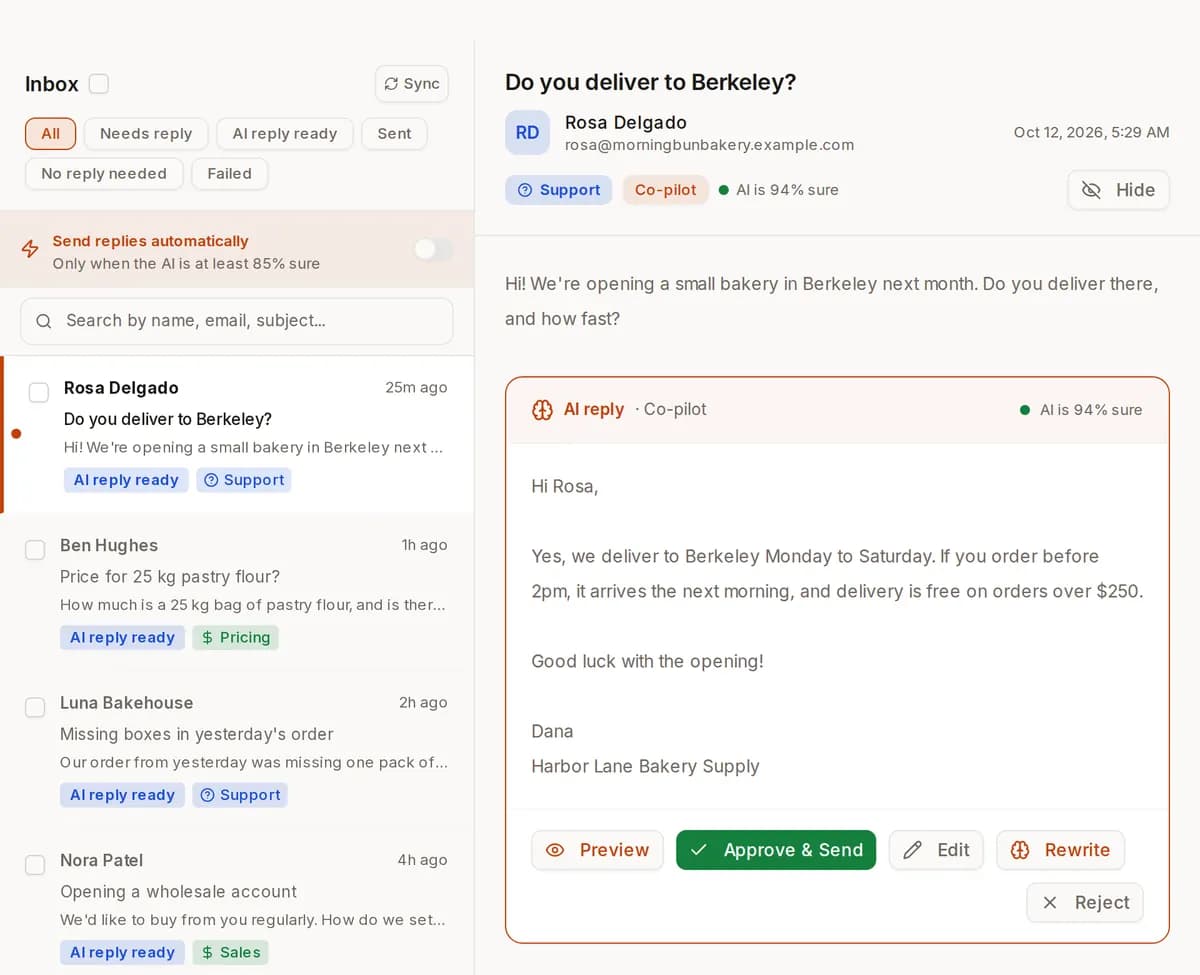
This is the part ReachClaw does, so here it is in the same plain terms as the rest of the list. You connect the Gmail inbox your customers write to. ReachClaw reads your website pages, the documents you upload and the notes you add, and when a new email arrives it sorts it: support, sales, partner, personal and general emails get a reply; newsletters, automatic notifications and spam are set aside, which clears bucket E for free.
The reply is written from your own material, links to the real page it used, and matches the sender's language. For each kind of email you choose a mode. In Co-pilot the reply waits in your Inbox and you send it with one click, or edit it first. In Autopilot it sends itself when it is confident (by default it needs 95% confidence and sends at most 50 replies a day on its own; anything else waits for you). In Manual it only drafts. A waiting reply also reaches you on Telegram with Approve and send and Reject buttons, so the two-batches-a-day routine survives.
What it does not do matters as much. It connects to Gmail only, it is not a helpdesk, it has no built-in Shopify or CRM connection (on the Scale plan it can look things up in tools you connect yourself as MCP servers), and it can be wrong, which is why the default is Co-pilot. It runs on your own Anthropic API key, billed by Anthropic; without a key it reads email but writes no replies.
Every paid plan is one flat price, from $6.99 a month on Solo for one inbox and 500 AI-handled emails. The same knowledge can answer visitors in a chat on your website so some of bucket A never becomes email. If you would rather compare it with helpdesk AI first, the best AI customer service software page puts it next to Intercom Fin, Zendesk AI and others.
Keep reading
AI email support, step by step
What ReachClaw does from a new email in Gmail to a reply the customer reads, and the three modes.
Best AI customer service software
ReachClaw next to Intercom Fin, Zendesk AI and others, with their pricing models.
AI chat widget for your website
The same knowledge answers visitors on your site before they email. Try it live.
Plans and prices
Solo, Growth and Scale, one flat price each, and what the monthly caps count.
Questions solo founders ask about support email
How do solo founders handle customer support email?
Mostly with a routine and a short list of written answers: fixed times to open the inbox, a stated reply window, saved replies for the questions that repeat, and a help page that grows from the real inbox. Software comes in when the repeats dominate: an AI that drafts replies from your pages for one inbox, or a helpdesk once a second person is answering. The order matters; a tool bought before the sort usually automates the wrong thing.
Is it OK to use canned responses for customer support?
Yes, as long as the answer is true and you edit it for the person. Customers object to replies that ignore what they asked, not to replies that were typed earlier. Keep the saved part to the facts (how a feature works, what a plan includes, how to fix a common problem) and write the first and last lines yourself. A saved reply that is out of date is worse than none, so re-read them when your product changes.
How fast should a one-person business reply to a customer email?
There is no universal number, and we do not publish a benchmark. What customers actually judge is whether you did what you said: a stated window of one business day that you keep beats an unstated promise of an hour that you miss. Set the window from your real routine, put it in an auto-reply and on your contact page, and answer bugs, payment problems and complaints ahead of everything else.
Do I need a helpdesk as a solo founder?
Usually not while one person answers one inbox. A helpdesk is good at the problems of a team: knowing who holds which email, shared canned replies, tags and reports. On your own, those are solved by Gmail labels and a list. The point to look at one is when a second person starts answering, or when you need a record of every conversation outside of Gmail.
Should I hire someone for support email or automate it?
Sort a week of email first. If most of it is questions your website could answer, write the answers once and let software send them; a person would be typing the same thing you type now. If most of it needs a look-up, a judgement call or a fix in the product, you need a person, even if that person is you for a few more months. Many one-person businesses end up with both: software for the repeats, a few hours of a helper for the rest.
How do I stop answering the same questions over and over?
Write the answer down once in a place that gets used. On your website, as a help page or FAQ, so some people never email. In Gmail, as a saved reply, so the ones who do email cost you two clicks. Or in a knowledge base that software answers from: ReachClaw writes replies from your pages and notes, and the same knowledge can answer visitors in a chat on your site before they write.
Can AI answer customer emails without sounding like a robot?
It can read like you if it writes from your own material and not from a generic script. ReachClaw writes each reply from your website pages, documents and notes, matches the sender's language and formality, and uses the tone and sign-off you set. When you edit a draft before sending, it keeps your version and shows the AI your recent edits as examples. It can still be wrong, so start in Co-pilot and read what it writes before you let anything send on its own.
How much time will AI email support save me?
We do not publish a time-saved, reply-rate or accuracy figure, and we would not trust one from anyone else without seeing how it was measured. What you can measure yourself: count the bucket A emails in your one-week sort, then run ReachClaw in Co-pilot for a week and count how many drafts you sent unchanged. That number, against your own inbox, is the only one that matters.
What does AI email support cost for a solo founder?
ReachClaw's Solo plan is $6.99 a month for one Gmail inbox and 500 AI-handled incoming emails a month, one flat price however many people use the dashboard. Growth is $29.99 for 2,000 emails and 3 inboxes, Scale $69.99 for 10,000 and 10. The AI runs on your own Anthropic API key, which Anthropic bills separately at its published prices. There is no free trial; the free account connects Gmail and lets you look around, but it does not write replies.
Read the first replies before you decide
Connect your Gmail, let ReachClaw read your website, and run a week in Co-pilot against your own sort. The routine above costs nothing and works either way.